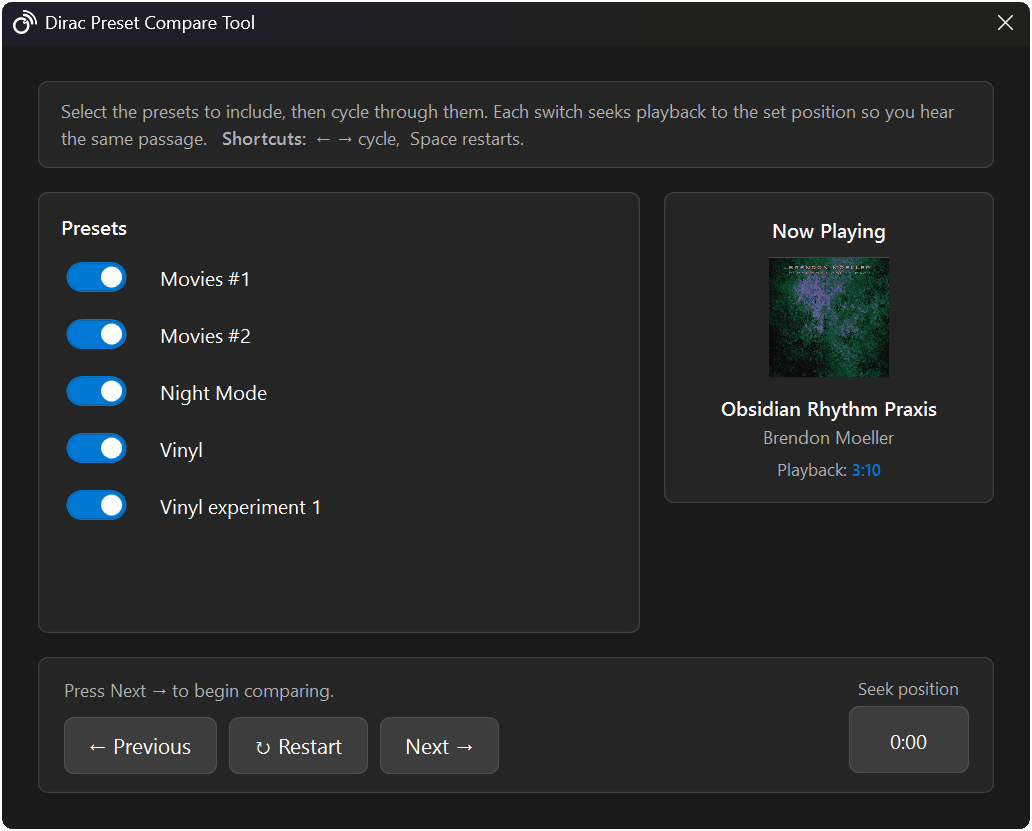
HiFi Control includes a Dirac Live Preset Compare Tool that lets you A/B compare Dirac presets directly from your Windows desktop. Pick which presets to include, then cycle through them while music keeps playing. On every switch, playback automatically seeks back to a position you set, so you hear the exact same passage each time and the comparison is actually fair.
Why comparing Dirac Live presets is normally so hard
On BluOS, NAD, and HEOS systems, your Dirac filters live in numbered slots inside the BluOS or HEOS app. To compare two of them you have to open the app, dig into the audio settings, change the active filter, then manually scrub the track back to where you were, and hope you land on the same spot at the same volume. By the time you’ve switched, your ear has already forgotten what the other preset sounded like. That friction is exactly what this tool removes.
Why fair A/B comparison matters
Listening comparisons are only meaningful when one variable changes at a time. If the passage is different, or the volume is different, or there’s a long gap while you fiddle with settings, you’re not really hearing the difference between two presets, you’re hearing the difference between two moments. The compare tool keeps the track, the passage, and the playback position constant so the only thing that changes is the Dirac preset.
How it works
- Start playing a track and pick the section you want to evaluate.
- Open the Dirac Preset Compare Tool from the Dirac section in HiFi Control.
- Toggle on the presets you want to include in the comparison.
- Set the seek position to the start of the passage you want to judge.
- Press Next → to start cycling through the selected presets.
Cycling through presets
Use ← Previous and Next → to move between the presets you selected. Each switch activates the next preset and seeks playback back to your set position, so you hear the same passage again instantly. Keyboard shortcuts make it faster: ← and → cycle presets, and Space restarts the current preset from the seek position.
| Action | Shortcut |
|---|---|
| Previous preset | ← |
| Next preset | → |
| Restart current preset | Space |
Which Dirac presets should you compare?
A few comparisons are worth running every time you set up Dirac Live:
- Different target curves: the Dirac target curve you choose has a big effect on the result. Save two or three and listen back to back.
- Corrected vs. bypassed: include a flat or bypassed preset so you can hear exactly what Dirac is doing.
- Per-position filters: if you measured for more than one seating position, compare them from your usual chair.
Supported devices and Dirac filter slots
Most Dirac-capable streaming devices store several filters in numbered slots. HiFi Control lets you compare across the slots your device exposes:
| Device / ecosystem | Dirac filter slots |
|---|---|
| Bluesound players | 5 |
| Denon / Marantz AVRs | 3 |
For reference, see Bluesound’s Dirac Live calibration guide and the Denon Dirac Live filter documentation.
Use cases
- Finding your preferred room correction curve. Dirac Live can generate several filter options, cycle through them and pick the one that sounds best from your listening position.
- Before and after. Put a corrected preset next to a flat or bypassed one to hear what room correction actually changed.
- A second opinion. Hand the keyboard to someone else and let them cycle through the presets blind.
Dirac Live preset comparison FAQ
How do I compare Dirac Live presets fairly? Keep the track, passage, and volume constant and switch only the preset. The compare tool does this for you by seeking playback back to a fixed position on every switch.
Can I A/B test Dirac filters on a Bluesound or NAD device? Yes. HiFi Control switches between the Dirac filter slots stored on your BluOS/NAD or HEOS device and seeks the track back so each filter plays the same passage.
How many Dirac Live filters can I save? It depends on the device: Bluesound players store up to 5, and Denon/Marantz AVRs store 3.
What keyboard shortcuts does the compare tool use? ← and → cycle presets, and Space restarts the current preset.
Getting started
The Dirac Live Preset Compare Tool is available in HiFi Control v1.0 and requires a Standard licence. Open the Dirac section in the main window to begin.
Ready to take control?
v1.6.3 · September 15, 2026 · 65 MB · Windows 10/11
Download HiFi ControlFree version available · No account required