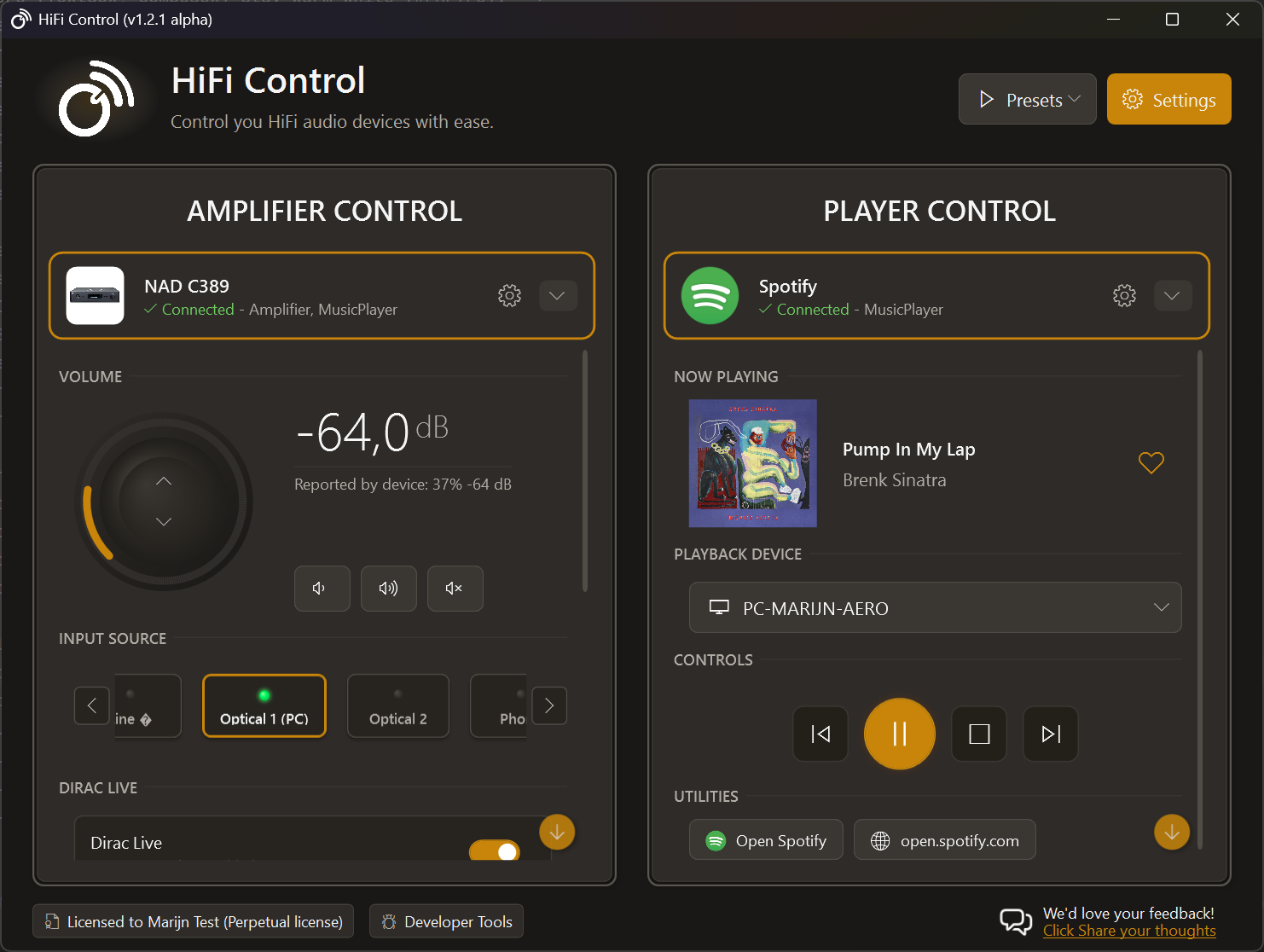
It’s taken months of development, a lot of testing, and plenty of feedback from early adopters, but HiFi Control v1.0 is finally here.
Why I Built HiFi Control
It started with a simple frustration. I own a beautiful NAD amplifier with BluOS built in, but controlling it from my Windows PC felt clunky. The web interface was limited, the mobile apps were designed for phones (not desktops) and there was no way to change the volume on the amplifier using hotkeys or the media keys on a keyboard. There has to be a better way…
There wasn’t. So I built one.
The idea behind HiFi Control is simple: if you spend your day at a desk surrounded by good audio equipment, you should have decent software to control it.
Turns out it’s about more than volume. People like me switch between devices, tweak Dirac profiles constantly, and juggle playlists across different streaming services. HiFi Control brings all of that into one application, and it’s a foundation I plan to keep building on. Expect regular updates with features other software doesn’t bother with, like linking a specific Dirac profile to a specific input source on your amplifier, which is coming soon.
What’s in v1.0
Version 1.0 pulls together everything I learned during the alpha and beta phases: fewer rough edges, more features. Here’s the full set:
| Feature | Description |
|---|---|
| BluOS Support | Full control over your BluOS-enabled devices. Manage playback, access streaming services, and configure your Bluesound, NAD, and DALI equipment with ease. |
| HEOS Integration | Connect and control your HEOS-compatible devices from Denon and Marantz. Enjoy ease of control, access to streaming services, and device management. |
| MusicCast Support | Control your Yamaha MusicCast-enabled devices. Manage playback, volume, and device settings directly from your desktop. |
| Hotkeys for everything | Change volume, select an input source, activate a preset... If you can control it, there's a hotkey for it! Hotkeys work system wide and you can also re-map your multimedia keys. |
| Presets | Group settings and operations from different devices, all in one action, with an assignable hotkey. |
| Microsoft Surface Dial | Experience intuitive volume control with the Microsoft Surface Dial. Simply rotate the dial to adjust your amplifier volume with precision; no need to switch windows or reach for your keyboard. |
| Spotify | Seamlessly integrate with Spotify to control playback on your HiFi devices. This integration brings hotkeys to like the song that's currently playing, and more! |
| Tidal Integration | Control your Tidal playback and enjoy lossless audio quality through your connected HiFi devices. |
| Control the volume of your amp, not your pc! | Change volume of the amp without exiting your current application. Perfect for presentations, gaming, and media consumption. |
| Direct access to Product Manuals | The manual for you amp is always just a click away. No more searching through multiple websites to find the right documentation. |
| Device Discovery | Automatically find and connect to all HiFi devices on your network with zero configuration. Easily recover devices that got a new IP address assigned. |
| Dirac profile A/B testing | Easily switch between your Dirac profiles to compare the sound quality (by using playback loops) and find the perfect setting for your room. |
| Dirac preset control (coming soon) | Easily switch between your favorite presets directly from the app interface or use global hotkeys. |
| System Tray | Quick access from your system tray to the main application |
Highlights
The features I’m most proud of:
- System-wide hotkeys: Control your amplifier from any application, while gaming, presenting, or just working, without alt-tabbing anywhere.
- Presets: Group multiple actions together. One hotkey can switch your input, set the volume, and activate a preset all at once.
- Microsoft Surface Dial support: Rotate the dial on your desk to smoothly adjust volume. Once you’ve tried it, a volume slider feels clunky by comparison.
- Automatic reconnection: Devices change IP addresses. HiFi Control handles it silently so you never have to manually reconfigure.
- Dirac preset evaluation mode: A/B compare presets in a loop to find the one you like best
The Road Ahead
Version 1.0 is just the beginning. Here’s a glimpse at what’s coming next:
Near-term
- Yamaha MusicCast support: ✅ Available since March 2026! Control your Yamaha MusicCast devices directly from HiFi Control.
- Apple Music Integration: Full playback control with artwork and metadata
- Night mode volume limits: Automatic volume caps so you can enjoy music late without disturbing anyone
- Workflow automations: your amplifier automatically muting when a video call starts, or a favorite playlist kicking in when you launch a game
- Multi-room audio control: Coordinate playback across multiple zones
- Elgato Stream Deck: Control your audio with the tap of a button on your Stream Deck, perfect for streamers and content creators
Longer-term vision
- MacOS: For all Apple users out there!
- Qobuz Support: For the high-resolution streaming enthusiasts
I’m building HiFi Control for the long haul, and most of the features so far came straight from user feedback. Got an idea? Get in touch.
Get Started
HiFi Control v1.0 is available now as a free download. The free tier already covers the basics well; if you need more, paid tiers add Tidal, Dirac, Surface Dial support, and multi-device management.
Ready to take control?
v1.6.3 · September 15, 2026 · 65 MB · Windows 10/11
Download HiFi ControlFree version available · No account required
Thanks to everyone who tested early builds, filed bugs, and pitched ideas, this release wouldn’t look the same without you.
Here’s to great sound!